CTET Signature Resize 2026 - 3KB to 30KB JPG
Resize your CTET September 2026 signature to the official 3.5cm x 1.5cm JPG/JPEG requirement and compress it under 30KB directly in your browser. All processing happens locally in your browser.
Photo / Signature Preview
What is CTET Signature Resize 2026?
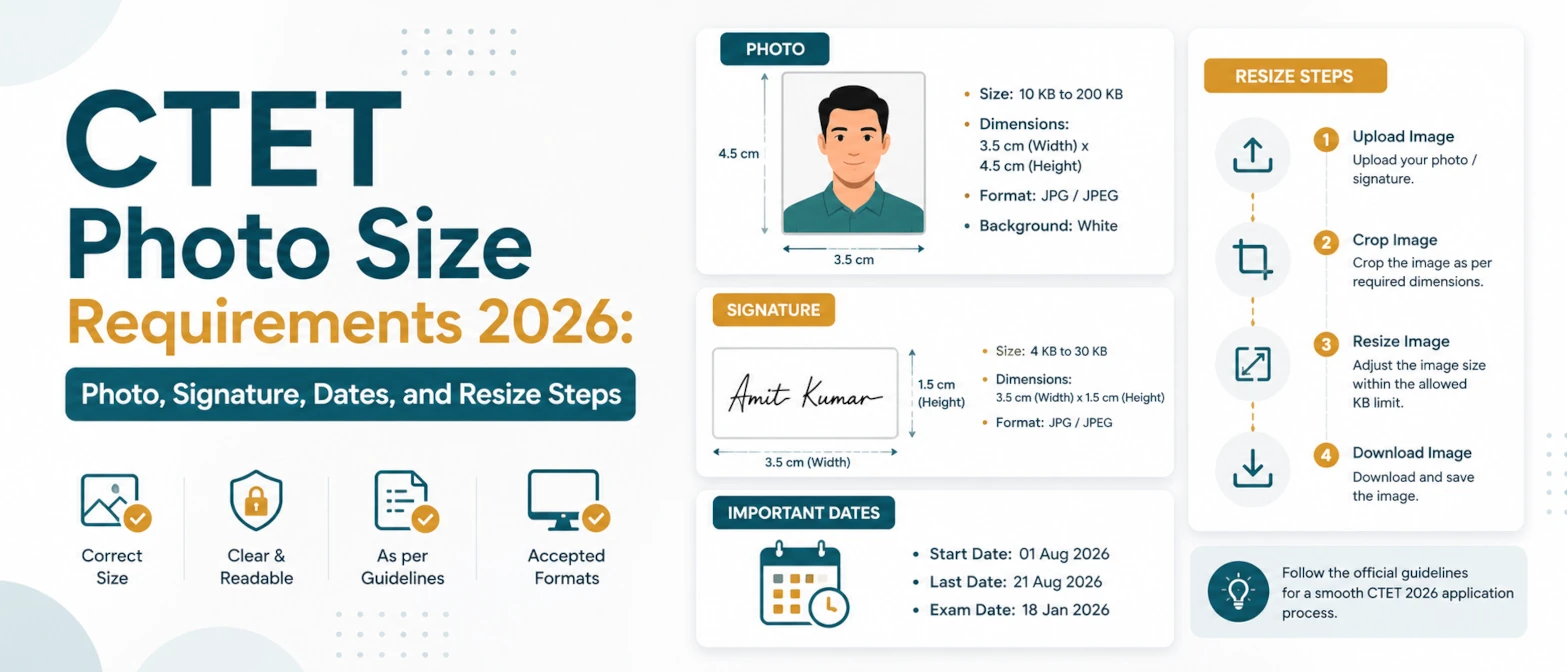
CTET Signature Resize 2026 is a browser-based signature resize and compression tool for the CTET September 2026 online application. The official CTET September 2026 Information Bulletin says the scanned signature must be uploaded in JPG/JPEG format, between 3KB and 30KB, with an image dimension of 3.5cm length x 1.5cm height. This page opens with a CTET signature preset so you can prepare the file without guessing the ratio.
The signature file is sensitive because it is part of your application identity. This tool runs entirely in your browser, requires no server upload, and data never leaves your device. The image is processed locally with Canvas, converted to JPG when needed, compressed under the official upper limit, and downloaded directly from your browser.
Source note: the CTET September 2026 bulletin was published on the official CTET website on May 11, 2026. The bulletin states that online applications are available from May 11, 2026 to June 10, 2026 before 11:59 PM and includes the scanned photograph and signature upload rules.
Official CTET September 2026 signature specifications
| Item | Requirement |
|---|---|
| Document | Scanned signature |
| Format | JPG/JPEG |
| File size | 3KB to 30KB |
| Dimensions | 3.5cm length x 1.5cm height |
| Use | Uploaded during the CTET September 2026 application form |
The CTET Signature 2026 preset uses a wide 3.5:1.5 shape and a JPG target of 30KB. The file must still be readable after compression. If your signature becomes too faint, start with a darker scan or photo, crop away empty paper, and try again with a higher quality setting.
How to use CTET Signature Resize 2026
- Sign clearly on plain white paper with dark blue or black ink, then scan or photograph the signature.
- Upload the signature image into the private browser workspace.
- Keep the CTET Signature 2026 preset selected. It resizes to the required 3.5cm x 1.5cm shape.
- Keep JPG output and target 30KB, then click Resize images.
- Download the result and verify that the signature is readable and accepted by the CTET portal.
If the output contains too much blank space, crop the source image closer to the ink before uploading it. If the signature touches the edges, use a source image with a little more white margin. The ideal output has the full signature visible, centred, and readable at small size.
Examples
| Input | Action | Expected result |
|---|---|---|
| Phone photo of a paper signature | Choose CTET Signature 2026 and target 30KB | Wide JPG signature under the official upper limit |
| Large scanned PNG signature | Convert to JPG and resize to the CTET ratio | JPG/JPEG upload file for the CTET form |
| Signature with large white border | Crop closer first, then resize | Readable signature with less wasted space |
For non-CTET forms, use the general Signature Resizer. If a portal asks for an exact KB value, Compress Image to Size can help with a custom target.
Use cases
- Prepare a CTET September 2026 scanned signature in the official 3KB to 30KB range.
- Convert a large signature image into JPG/JPEG format for the CTET application form.
- Resize a signature to the 3.5cm x 1.5cm official dimension without uploading it.
- Check readability before submitting the final online application.
For the matching photograph requirement, use CTET Photo Resize 2026. For one page that handles both files, open CTET Photo and Signature Resize 2026.
Validation checklist
- Confirm the downloaded signature is JPG or JPEG.
- Confirm the file size is between 3KB and 30KB.
- Confirm the full signature is visible and not cut off.
- Confirm the signature is dark enough to read on a white background.
- Upload it to the CTET form and confirm the portal accepts it before final submission.
Privacy and data handling
CTET Signature Resize 2026 processes your signature locally in browser memory. The tool requires no server upload, and data never leaves your device. TryFormatter does not store the signature image, log the file, or send it to a remote processing queue.
Because signatures are personal identity assets, avoid sending them through unknown upload tools. Process the file locally, download the final JPG, and clear the workspace if you are on a shared computer.
Common mistakes
Many rejected signature files are either too large, too small, too faint, or the wrong shape. Another common problem is photographing the entire sheet of paper instead of the signature area, which creates a tiny unreadable signature after resizing. Crop around the signature before using the CTET preset if your source image has too much blank paper.
Do not use decorative filters, coloured backgrounds, or a signature placed over lined paper. Keep the source plain, high contrast, and close to the actual ink.
Frequently Asked Questions
What is the CTET signature size for 2026?
For CTET September 2026, the official bulletin lists the signature as JPG/JPEG, 3KB to 30KB, with dimensions of 3.5cm x 1.5cm.
Does this CTET signature compressor upload my signature?
No. The signature is resized and compressed entirely in your browser. It requires no server upload and data never leaves your device.
What should I do if the signature becomes unreadable?
Start with a darker, clearer signature image, crop away extra blank paper, and use a higher quality setting before downloading again.
Can I prepare the CTET photo on the same site?
Yes. Use CTET Photo Resize 2026 for the 10KB to 100KB photograph requirement, or use the combined CTET Photo and Signature Resize 2026 page.