CTET Photo Resize 2026 - 10KB to 100KB JPG
Resize your CTET September 2026 photograph to the official 3.5cm x 4.5cm JPG/JPEG requirement and compress it under 100KB directly in your browser. All processing happens locally in your browser.
Photo / Signature Preview
What is CTET Photo Resize 2026?
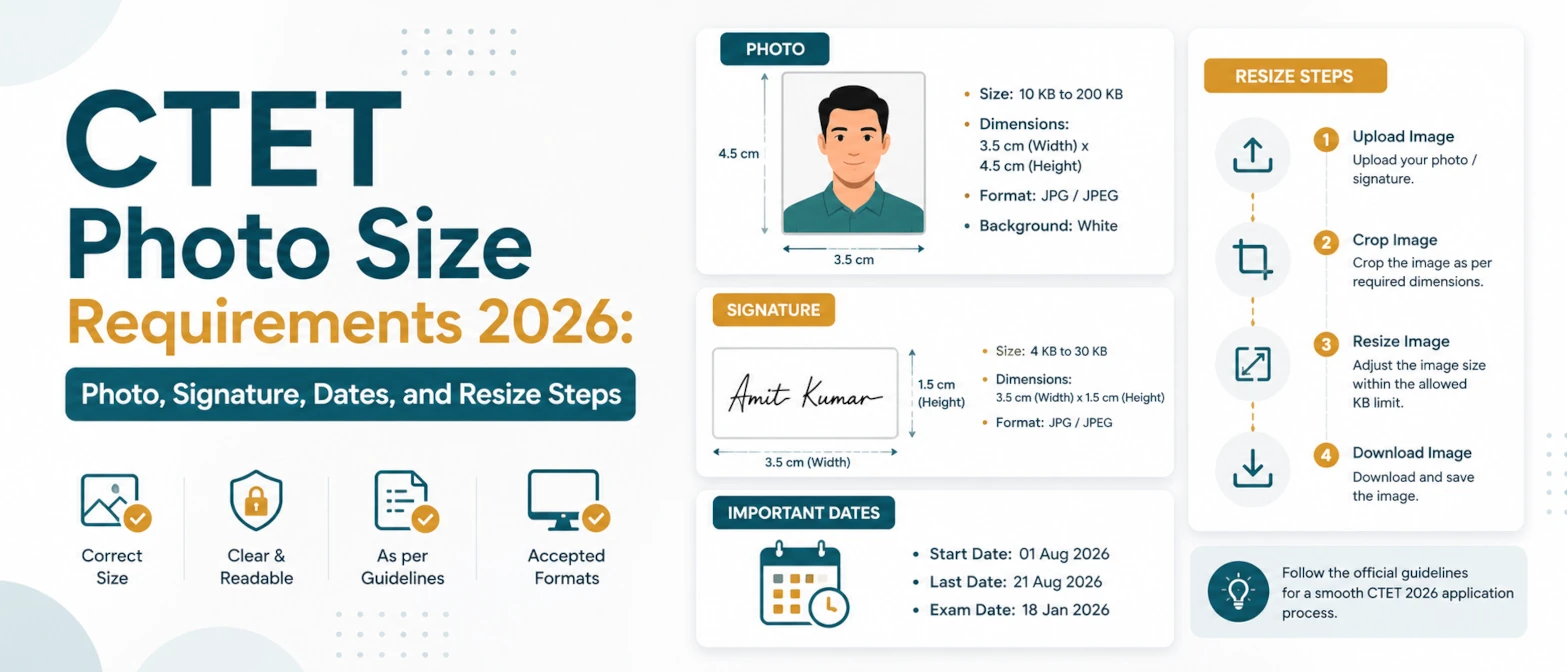
CTET Photo Resize 2026 is a browser-local photo resizing and compression tool for candidates preparing the CTET September 2026 online application. The official CTET September 2026 Information Bulletin says the scanned photograph must be uploaded in JPG/JPEG format, between 10KB and 100KB, with an image dimension of 3.5cm width x 4.5cm height. This page gives you a ready CTET photo preset so you do not need to calculate the aspect ratio manually.
The tool runs entirely in your browser, requires no server upload, and data never leaves your device. Your photo is opened with browser Canvas, cropped to the CTET photo shape, compressed as JPG, and downloaded back to your device. That matters because CTET photos are identity documents: the same photograph may be checked at the examination centre, so it should be clear, recent, and not processed through unknown upload services.
Source note: the CTET September 2026 bulletin was published on the official CTET website on May 11, 2026. The bulletin lists online application dates from May 11, 2026 to June 10, 2026 before 11:59 PM and provides the photograph and signature upload specifications.
Official CTET September 2026 photo specifications
| Item | Requirement |
|---|---|
| Document | Latest scanned photograph |
| Format | JPG/JPEG |
| File size | 10KB to 100KB |
| Dimensions | 3.5cm width x 4.5cm height |
| Use | Uploaded during the CTET September 2026 application form |
In this tool, the CTET Photo 2026 preset uses a 3.5:4.5 portrait ratio and JPG output. The target KB control is set to 100KB by default so the result is compressed under the official upper limit. After downloading, check the file size on your device. If the file is below 10KB and looks too light or blocky, increase quality or start from a clearer source photo.
How to use CTET Photo Resize 2026
- Upload a recent portrait photo from your device. A clear front-facing photo with a plain background usually works best.
- Keep the CTET Photo 2026 preset selected. It crops to the required 3.5cm x 4.5cm portrait shape.
- Keep output format as JPG and target size as 100KB, or adjust quality if your downloaded file needs a slightly larger size.
- Click Resize images, review the output dimensions and file size, then download the JPG file.
- Upload the downloaded image in the CTET form and confirm the portal accepts it before final submission.
The crop mode is designed to fill the CTET frame. If your face is cut off, use a source image with more space around the head and shoulders. If the photo becomes blurry, avoid upscaling a tiny source file; start with a larger original and let the browser resize it down.
Examples
| Input | Action | Expected result |
|---|---|---|
| Large phone photo, 2MB JPG | Choose CTET Photo 2026 and target 100KB | Portrait JPG under 100KB in the CTET ratio |
| Square profile photo | Crop to fill 3.5cm x 4.5cm | CTET-style portrait with the face centred |
| PNG portrait from an editor | Convert to JPG and compress | JPG/JPEG file suitable for the CTET upload field |
If you only need a smaller file and not the CTET crop, use Compress Image to Size. If you are preparing another form with a general 100KB limit, use Resize Image Under 100KB.
Use cases
- Prepare the CTET September 2026 candidate photograph before filling the online application.
- Convert a PNG or large JPG photo into a CTET-ready JPG/JPEG file.
- Crop a portrait into the 3.5cm x 4.5cm CTET photo shape without uploading it to a server.
- Compress the photo under the 100KB upper limit while keeping it clear enough for identity checking.
For the matching signature requirement, use CTET Signature Resize 2026. If you want both upload files from one workspace, use CTET Photo and Signature Resize 2026.
Validation checklist
- Confirm the downloaded file is JPG or JPEG.
- Confirm the file size is between 10KB and 100KB.
- Confirm the photo is recent, clear, and front-facing.
- Confirm the face is not cropped too tightly and the background is acceptable for the CTET form.
- Confirm the CTET application portal accepts the file before final submission.
Privacy and data handling
CTET Photo Resize 2026 uses browser-local processing. The selected image is read in your browser session, resized with Canvas, compressed to JPG, and downloaded from your device. It requires no server upload, and data never leaves your device. TryFormatter does not store your photo, account details, application number, or file contents.
Close the tab or clear the workspace after downloading if you are using a shared computer. For the safest workflow, keep the original photo and final CTET JPG in a private folder until your application is submitted.
Common mistakes
The most common mistake is focusing only on KB size and ignoring the official dimensions. A photo can be under 100KB but still fail if it is the wrong shape or too unclear. Another mistake is compressing the file so much that facial details are lost. The CTET bulletin notes that the latest photograph is required to avoid inconvenience at the centre, so keep the final image recognizable.
Do not use screenshots of photos, heavily filtered selfies, or images with large borders. Start with a clean portrait, use the CTET preset, and check the downloaded file before uploading.
Frequently Asked Questions
What is the CTET photo size for 2026?
For CTET September 2026, the official bulletin lists the photograph as JPG/JPEG, 10KB to 100KB, with dimensions of 3.5cm x 4.5cm.
Does this CTET photo compressor upload my photo?
No. The tool runs entirely in your browser, requires no server upload, and data never leaves your device.
Why is my CTET photo below 10KB after compression?
If the downloaded file is below the official lower limit, increase quality or use a clearer source image, then resize again.
Can I resize the CTET signature here too?
Use the dedicated CTET Signature Resize 2026 page or the combined CTET Photo and Signature Resize 2026 page for the 3KB to 30KB signature requirement.