
Compress Image Online Free
Reduce image file size directly in your browser. Adjust compression quality, convert formats, compare visual quality, and download optimized JPG, PNG, or WebP images instantly. All processing happens locally in your browser.
Choose an Image
Choose an Image to Compress
Select or drop a JPG, PNG, WebP, or AVIF image to compress.
Your image is compressed directly in your browser. Files are never uploaded to any server.
What is image compression and what does it do?
Image compression reduces the amount of data stored in an image file. This makes the file easier to upload, share, email, and use on a website without changing the subject or composition of the picture.
A photo taken on a phone or camera can be several megabytes even when it will only be viewed on a normal screen. Compression removes or reorganises data that is less noticeable during everyday viewing. The aim is to create a smaller file while keeping the result clear enough for its intended use.
The amount you can save depends on the image. Photographs, screenshots, logos, transparent graphics, and files that have already been optimised can all produce different results.
How to compress an image
1. Choose an image
Drag a supported image into the upload area or select “Choose Image” to pick a file from your device.
2. Select a quality level
Start with the Balanced preset or adjust the quality slider yourself. A higher value keeps more detail, while a lower value normally creates a smaller file.
3. Check the preview
Compare the original and compressed versions. Pay attention to faces, text, fine edges, gradients, and other areas where quality changes are easier to notice.
4. Download the result
Review the new file size and download the compressed image when you are satisfied with the balance between size and appearance.
Real example: compressing a flower photograph
This example uses a 1365 × 2048 pixel JPG photograph. The original file was compressed at a quality setting of 80 without changing its width or height.
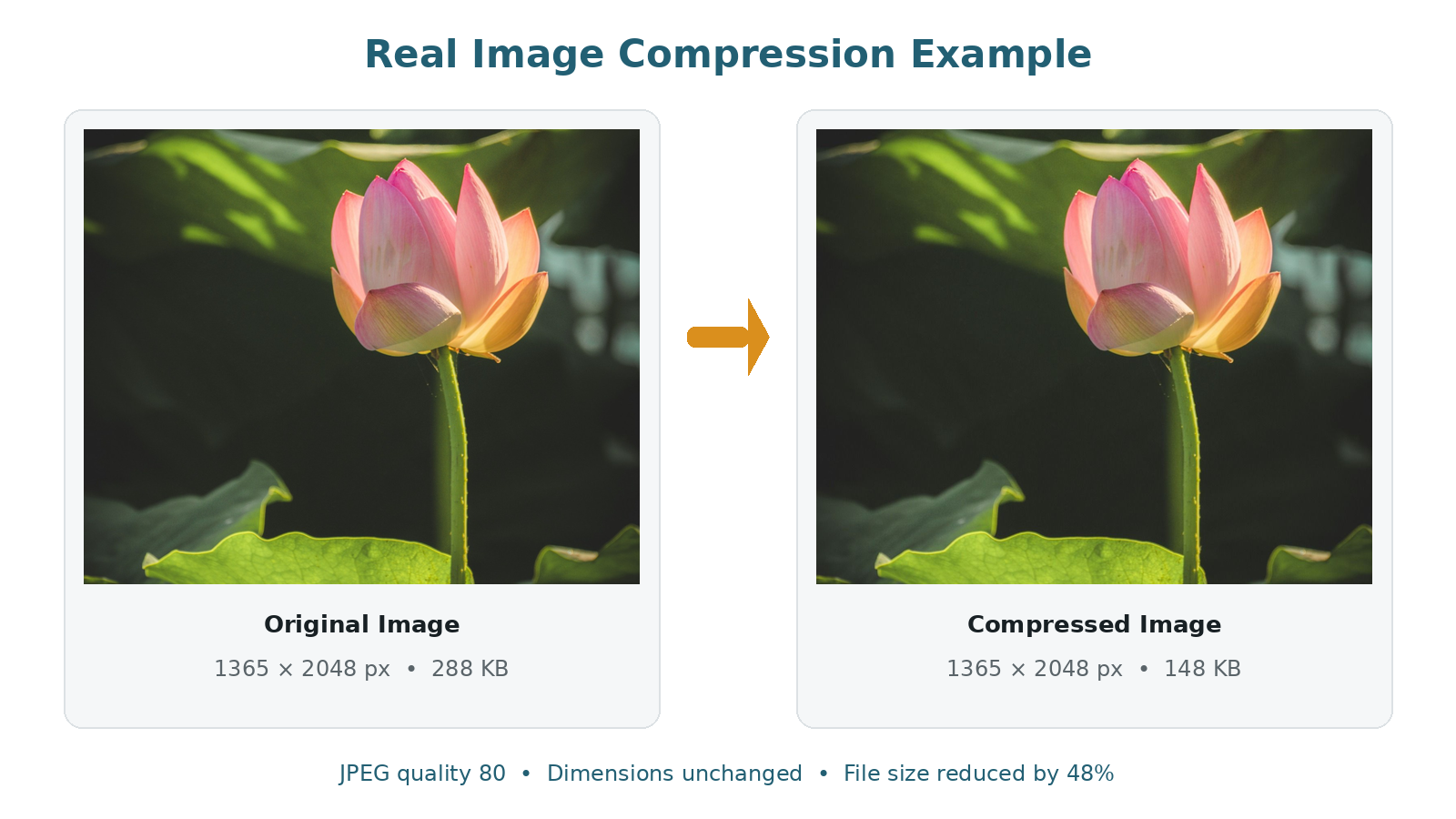
Measured result
The compressed image remains suitable for normal website viewing while using less storage and transfer data. These figures come from the displayed sample, not an estimated saving.
Your result may be different. Images with flat colours, repeated patterns, heavy detail, transparency, or existing compression respond differently to the same quality setting.
How to choose the right quality setting
There is no single quality value that works best for every image. The right setting depends on how the picture will be used and how much detail it contains.
Best Quality
Use a higher setting when the image contains faces, text, product details, or anything that must remain especially clear.
Balanced
This is a practical starting point for blog images, general uploads, email attachments, and everyday website photographs.
Smallest Size
Use a lower setting when meeting a strict upload limit matters more than retaining every small visual detail.
Check the image before downloading
A small file is not useful if important text becomes difficult to read or fine details disappear. Use the comparison view and raise the quality when the result looks noticeably damaged.
Choose JPG, PNG, WebP, or AVIF
The selected format can affect the final size as much as the quality setting. Keeping the original format is often the safest choice, but changing formats can be useful when the destination supports it.
| Format | Good choice for | Transparency | What to expect |
|---|---|---|---|
| JPG | Photographs and general uploads | No | Offers adjustable quality and often creates practical file sizes for photos. |
| PNG | Logos, screenshots, diagrams, and text | Yes | Keeps sharp edges and transparency but may remain large when used for photographs. |
| WebP | Modern websites and online content | Yes | Supports adjustable compression and transparency in modern browsers. |
| AVIF | Web projects where AVIF is supported | Yes | Can produce efficient results, but browser decoding and encoding support varies. |
Do not assume that converting an image will always make it smaller. A photograph converted from JPG to PNG, for example, may become much larger. Compare the result before downloading it.
Use cases: when image compression is useful
Websites and blogs
Smaller image files can reduce the amount of data transferred when a page loads, especially on image-heavy articles, galleries, and product pages.
Email and messaging
Compress large photographs or scanned documents when an attachment is difficult to send or takes too long to upload.
Forms and portals
Reduce a photograph, signature, or scanned document when an application portal has a maximum upload size.
If you need an exact limit such as 50 KB or 100 KB, use the Compress Image to KB tool. To process several files together, use the Bulk Image Compressor.
Compression and resizing are not the same
Compression changes how image data is stored. Resizing changes the number of pixels in the image.
For example, a 2000 × 1500 pixel photograph can be compressed while remaining 2000 × 1500 pixels. If it is resized to 1000 × 750 pixels, both its width and height are reduced.
Use compression when you want a smaller file without changing the dimensions. Use the Image Resizer when a website, form, or layout requires a particular width and height. Combining both methods can help when an image must meet strict dimension and file-size limits.
Browser processing and privacy
Your image is processed in the browser
The image file is handled inside your browser for compression and is not uploaded to TryFormatter for processing. The result remains on your device unless you choose to upload or share it elsewhere.
Performance depends on the image dimensions, file format, browser, and available device memory. Very large photographs may take longer to process, particularly on older phones or devices with several browser tabs open.
Frequently Asked Questions
Is my image uploaded to a server?
The image file is processed inside your browser and is not uploaded to TryFormatter for compression. The result stays on your device unless you choose to upload it elsewhere.
Does image compression reduce quality?
Lossy formats such as JPG and WebP may remove some visual detail. Higher quality settings retain more detail, while lower settings usually produce smaller files.
What quality setting should I use?
Start with the Balanced preset or a value near 80. Increase it when text or fine details look unclear, or reduce it when you need a smaller file.
Which image formats are supported?
The tool supports common formats such as JPG, PNG, and WebP. AVIF availability depends on whether the browser can decode and encode it.
Why is the compressed image larger than the original?
The original may already be well optimised, the selected quality may be high, or the output format may not suit the image. PNG files, for example, can be much larger than JPG files for photographs.
Can I compress an image to a specific size in KB?
This page uses quality-based compression. Use the Compress Image to KB tool when you need a specific limit such as 50 KB or 100 KB.
Can I compress several images at once?
This page processes one image at a time. Use the Bulk Image Compressor to compress several files together.
Does the image compressor work on mobile devices?
Yes, it works in supported mobile browsers. Very large files may take longer or may be limited by the memory available on the device.
Related Tools
Expert Guides & Tutorials

How to Optimize Images for Web Performance: The Ultimate 2026 Guide
Slow websites lose users. Learn the professional secrets of image optimization—from WebP conversion to bulk compression—and boost your Core Web Vitals instantly.
Read Guide →
JPG vs PNG vs WebP: Which Image Format is Best in 2026?
Choosing the right image format can make a huge difference in quality, file size, and website speed. Discover why WebP is the winner for 2026.
Read Guide →
How to Compress Image to 10KB, 20KB, 50KB or 100KB Online (Free & Instant)
Need to meet strict file size limits for government forms? Learn how to compress images to exactly 10KB, 20KB, 50KB, or 100KB in your browser with 100% privacy.
Read Guide →