CTET Photo & Signature Resize 2026 - 10KB to 100KB Online
Prepare both CTET September 2026 upload files in one browser-local workspace: photo 3.5cm x 4.5cm under 100KB and signature 3.5cm x 1.5cm under 30KB. All processing happens locally in your browser.
Photo / Signature Preview
What is CTET Photo and Signature Resize 2026?
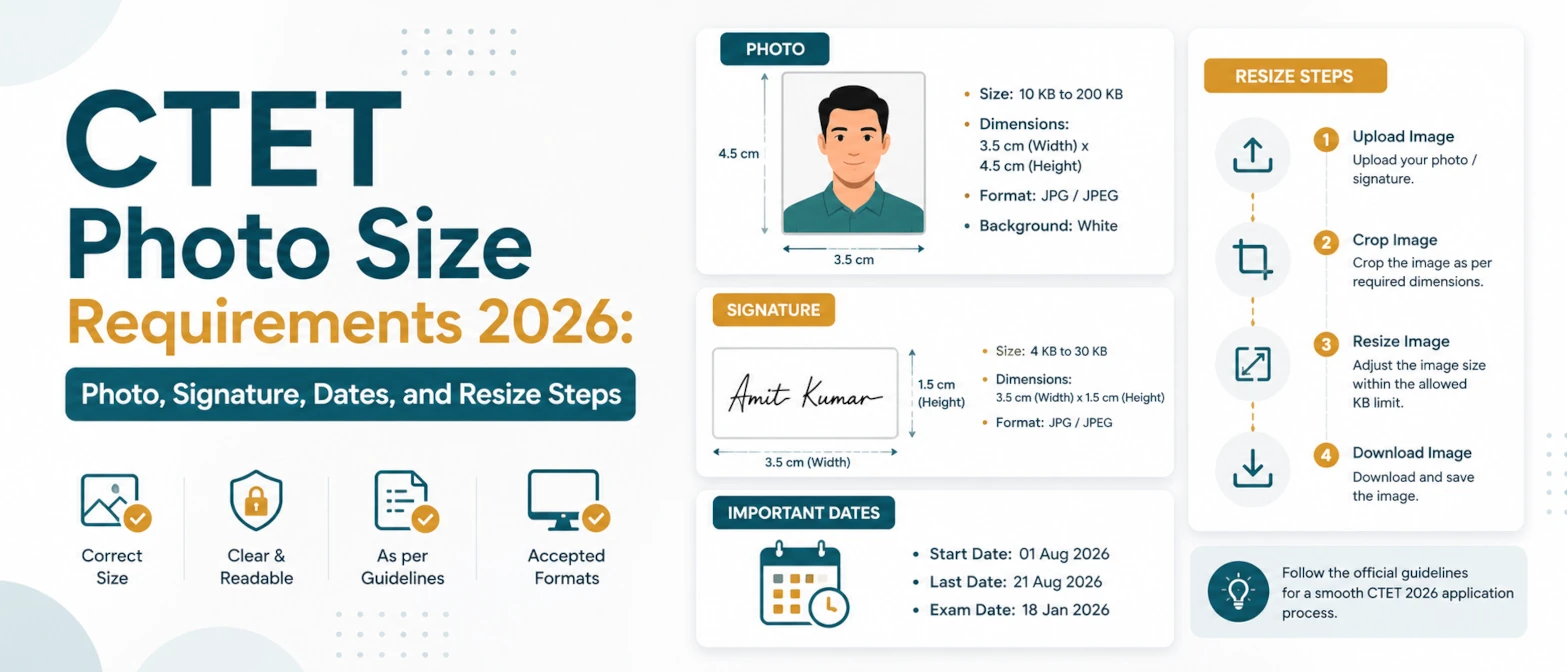
CTET Photo and Signature Resize 2026 is a combined browser tool for preparing both scanned upload images required by the CTET September 2026 online application. The official CTET September 2026 Information Bulletin requires a JPG/JPEG photograph between 10KB and 100KB at 3.5cm x 4.5cm, and a JPG/JPEG signature between 3KB and 30KB at 3.5cm x 1.5cm. This page includes both CTET presets in one workspace so candidates can resize the photo and signature without moving between unrelated tools.
The workspace runs entirely in your browser, requires no server upload, and data never leaves your device. That is important for exam application files because photographs and signatures are identity assets. You can select the CTET Photo 2026 preset for the portrait, then switch to CTET Signature 2026 for the signature. Each file is processed locally and downloaded as a JPG for upload to the CTET form.
Source note: the official CTET September 2026 bulletin was published on ctet.nic.in on May 11, 2026. The bulletin lists the online application window from May 11, 2026 to June 10, 2026 before 11:59 PM and gives the scanned image rules used on this page.
Official CTET September 2026 upload specifications
| Item | Size | Format | Dimensions |
|---|---|---|---|
| Photograph | 10KB to 100KB | JPG/JPEG | 3.5cm x 4.5cm |
| Signature | 3KB to 30KB | JPG/JPEG | 3.5cm x 1.5cm |
The combined tool opens with the photo preset and a 100KB target because the photo is usually the first upload file candidates prepare. For the signature, choose CTET Signature 2026 from the preset dropdown and change the target KB to 30KB. The preset list also keeps regular document options available, but the CTET presets are the ones designed for this notification.
How to use CTET Photo and Signature Resize 2026
- Upload your recent photograph, keep CTET Photo 2026 selected, output as JPG, and target 100KB.
- Click Resize images and download the CTET photo file. Check that it is between 10KB and 100KB.
- Clear or add the signature image, choose CTET Signature 2026, output as JPG, and set target size to 30KB.
- Resize and download the CTET signature file. Check that it is between 3KB and 30KB.
- Upload both files in the CTET application form and verify that the portal accepts them before final submission.
If you prefer focused pages, use CTET Photo Resize 2026 for the photograph and CTET Signature Resize 2026 for the signature.
Examples
| Input | Tool setting | Output |
|---|---|---|
| Recent portrait photo | CTET Photo 2026, JPG, target 100KB | 3.5cm x 4.5cm style JPG photo under 100KB |
| Scanned signature | CTET Signature 2026, JPG, target 30KB | 3.5cm x 1.5cm style JPG signature under 30KB |
| Large phone image or PNG | Convert to JPG and compress locally | Upload-ready CTET image without server transfer |
For general form uploads, you can also use Passport Photo Resizer, Signature Resizer, Resize Image Under 100KB, or Compress Image to Size.
Use cases
- Prepare both CTET September 2026 scanned upload files from one page.
- Resize a photo to the official 3.5cm x 4.5cm shape and keep it within 10KB to 100KB.
- Resize a signature to the official 3.5cm x 1.5cm shape and keep it within 3KB to 30KB.
- Convert images to JPG/JPEG for the CTET application form without uploading them to another server.
- Check output dimensions, size, and readability before final submission.
Validation checklist
- Photo is JPG/JPEG, clear, recent, and between 10KB and 100KB.
- Photo uses the CTET 3.5cm x 4.5cm portrait ratio and is not overly cropped.
- Signature is JPG/JPEG, readable, and between 3KB and 30KB.
- Signature uses the CTET 3.5cm x 1.5cm wide ratio and has a clean background.
- Both files are accepted by the CTET portal before you complete payment or final submission.
Privacy and data handling
This CTET photo and signature resize tool uses local browser processing. Files are read in your tab, rendered to Canvas, compressed, and downloaded from your device. It requires no server upload, and data never leaves your device. TryFormatter does not store candidate photos, signatures, application numbers, or form details.
Use this local workflow especially when working on a shared network or public computer. After downloading the final files, remove them from the workspace or close the tab. Keep your original and final files in a private folder until the CTET application is complete.
Common mistakes
Do not upload the same source image for both fields. The photograph and signature have different shapes and different KB limits. A photo under 100KB is not automatically valid as a signature, and a signature under 30KB is not automatically valid as a photograph. Use the correct CTET preset for each file.
Do not compress so aggressively that the face or signature becomes hard to recognize. Also avoid uploading files with the wrong extension, such as PNG, when the notification asks for JPG/JPEG. Always check the downloaded file before adding it to the CTET form.
Frequently Asked Questions
What are the CTET photo and signature sizes for 2026?
The CTET September 2026 bulletin lists the photo as JPG/JPEG, 10KB to 100KB, 3.5cm x 4.5cm, and the signature as JPG/JPEG, 3KB to 30KB, 3.5cm x 1.5cm.
Can I resize both CTET files on this page?
Yes. Use CTET Photo 2026 for the photograph, then switch to CTET Signature 2026 and set target size to 30KB for the signature.
Are my CTET photo and signature uploaded to TryFormatter?
No. The tool runs entirely in your browser, requires no server upload, and data never leaves your device.
Why does the output need to be JPG or JPEG?
The official CTET September 2026 bulletin asks candidates to upload scanned photograph and signature images in JPG/JPEG format.