Original Portrait
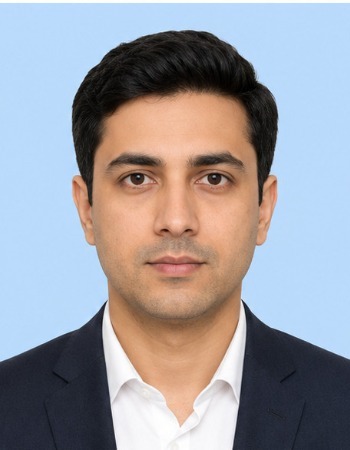
Dimensions: 350 × 450 px
File size: 30.1 KB
Background: Light blue backdrop

Crop and resize a portrait for passport, visa, ID and application forms. Enter the required dimensions, check face position and download the prepared image. All processing happens locally in your browser.
Drop a clear JPG, PNG or WebP portrait here, or choose a file from your device.
Supports JPG, PNG and WebP filesPresets are convenient examples. Always follow the dimensions shown by your official application.
Selected colour fills crop margins when zooming out or fitting the photo.Note: To turn an existing blue backdrop into white, use our free Magic Background Remover first.
The tool aims to produce a result at or below the selected limit. Very small limits may reduce image clarity.
A passport photo resizer helps crop and resize a portrait to the dimensions requested by a passport, visa, ID or online application.
It can also help change the image format and reduce the file size when an upload form has a maximum KB limit.
The tool does not decide whether a photo meets every official rule. Always follow the instructions provided by the authority handling your application.
Common scenarios and use cases for preparing application photos include:
This example shows how a portrait can be cropped and prepared for an application. These dimensions are used only to demonstrate the tool and are not a universal passport-photo requirement.
Dimensions: 350 × 450 px
File size: 30.1 KB
Background: Light blue backdrop
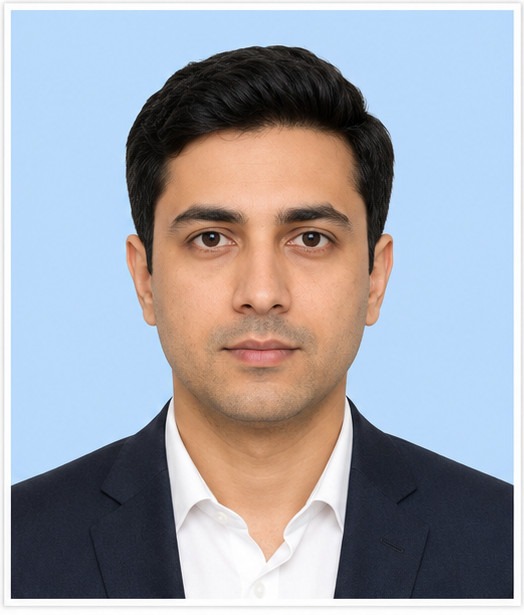
Dimensions: 524 × 615 px
Preparation: Positioned head & white margin frame
File size: 54.8 KB
Format: JPG
This example demonstrates cropping, resizing and export only. It does not represent a universal passport standard or guarantee that an authority will accept the photo.
Passport, visa and ID photo rules differ by country, authority and application type.
One application may request pixels, while another may use millimetres or inches. Requirements can also cover background colour, head size, eye position, expression, file format, file size and photo age.
Always use the measurements and instructions shown on the official application page. A convenient preset should not replace those requirements.
Digital forms usually describe image size in pixels.
Printed-photo instructions may use millimetres or inches together with a DPI value.
The final pixel dimensions depend on both the physical size and the selected DPI. A higher DPI creates more pixels for the same printed size.
| Example physical size | DPI | Calculated pixel size | Purpose |
|---|---|---|---|
| 35 × 45 mm | 300 | Approximately 413 × 531 px | Example of converting millimetres to pixels |
| 35 × 45 mm | 600 | Approximately 827 × 1063 px | Same physical size with higher pixel density |
| 2 × 2 inches | 300 | 600 × 600 px | Example of converting inches to pixels |
| 50 × 70 mm | 300 | Approximately 591 × 827 px | Example of a larger physical photo size |
These are calculation examples only. Use the physical size and DPI stated in your official instructions.
Use the visual guide to keep the portrait centred and leave enough space above the head.
Make sure the complete head is visible and that the chin, hair and shoulders are not cut off unless the application specifically requires a tighter crop.
The guide is only a visual aid. Official rules may define a specific head height, eye line or margin, so compare the result with the instructions for your application.
Choose the background colour required by the application.
JPG is accepted by many image-upload forms, while some applications also allow PNG. Use WebP only when the destination clearly lists it as supported.
When a form gives a maximum KB limit, reduce the file until the downloaded image is at or below that limit. Check that the face and fine details remain clear before submitting it.
A solid background fill is not the same as removing an existing background. If the original background is uneven or detailed, use our free Magic Background Remover tool to remove the existing backdrop before resizing.
The tool can prepare technical parts of the image, but you must still verify the official photo rules.
| Task | What the tool can help with | What you must verify |
|---|---|---|
| Dimensions | Crop and resize to entered values | The official width and height |
| File format | Export a supported image type | The formats accepted by the application |
| File size | Reduce the image toward a KB limit | The maximum size allowed |
| Face position | Provide visual positioning guides | The official head-size and eye-line rules |
| Background | Preview or apply supported solid colours | The required colour and background quality |
| Photo acceptance | Not determined by the tool | The final decision belongs to the issuing authority |
Dimensions and photo rules differ by authority and application type.
The issuing authority makes the final decision.
Compare the crop with the head-position rules in your application.
Filling exposed crop areas does not replace a detailed or uneven background.
Enlarging an image cannot restore detail that is missing from the source.
Review the eyes, hair, face edges and fine details before submitting the result.
Printer scaling, paper size and print settings can change the physical result.
Save the original in case you need another crop, size or format.
Privacy is fundamental when handling identity photos. The image is processed in your current browser session and does not need to be uploaded to TryFormatter servers for resizing.
No files leave your device, ensuring complete privacy for your personal identification photos. Large photos may use more device memory and take longer to process locally.
Keep the page open until the image has been generated and downloaded.
There is no single worldwide size. Use the dimensions shown by the passport, visa or ID authority handling your application.
Yes. Enter the physical size and DPI so the tool can calculate the required pixel dimensions.
Use the DPI stated in the official instructions. Do not assume one value applies to every application.
No. The tool can help with dimensions, format and file size, but the issuing authority decides whether the photo meets all requirements.
Yes. Enter the maximum file size and check whether the downloaded result is at or below that limit.
The Passport Photo Resizer fills exposed crop margins with your selected background colour (such as White). If your original photo has a non-white or blue background behind your head, first use our free Magic Background Remover to remove the existing backdrop, then upload the processed image into the Passport Photo Resizer and select White under Background Colour.
Yes, when it is clear, well lit and meets the official rules for framing, background and image quality.
It can provide a visual positioning guide. You must still compare the result with the official head-size and eye-line rules.
No file upload is needed for resizing. The image is processed in the current browser session.
Yes. Keep the source in case you need another crop, size or format.