
Model Context Protocol Security Patterns for Real Workflows
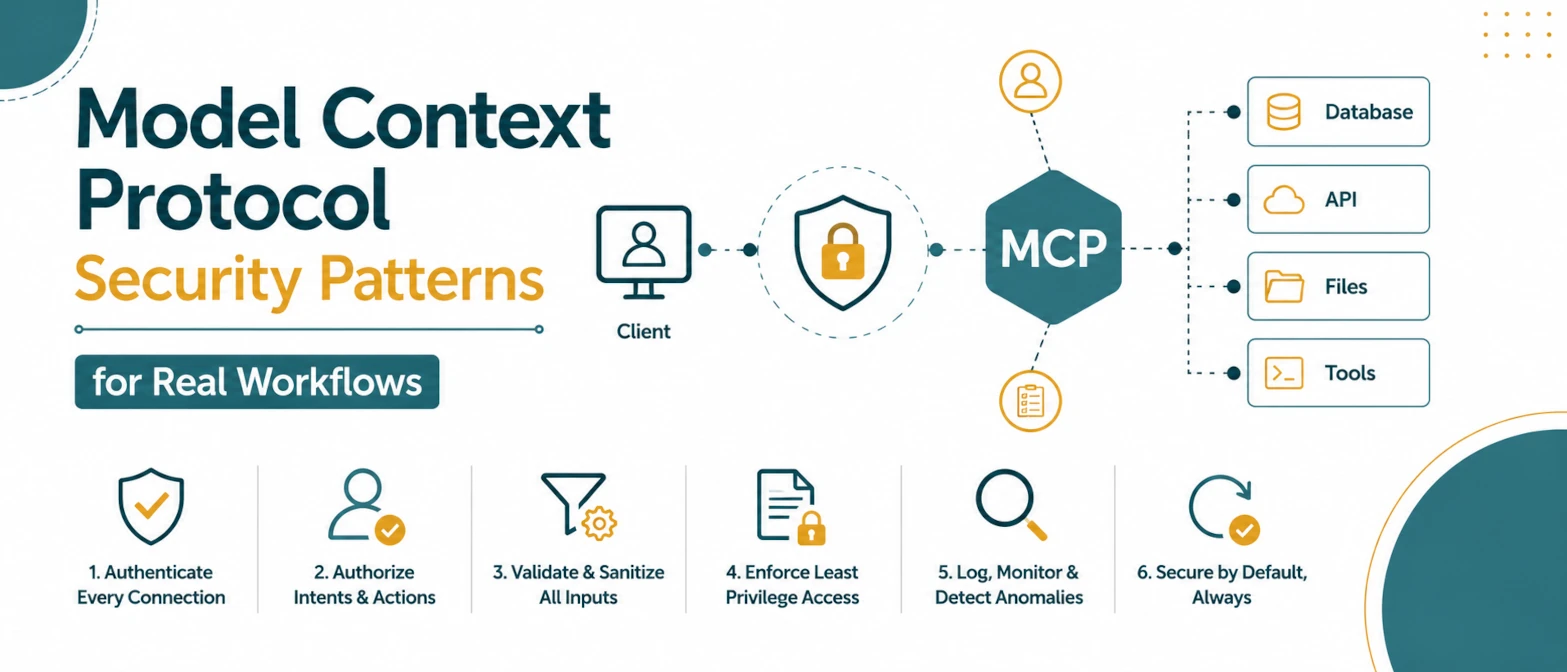
Model Context Protocol (MCP) makes tool integration faster, but it also expands the attack surface. A model that can call many tools can accidentally chain them in unsafe ways if boundaries are weak. Secure MCP design starts with least privilege and explicit policy.
Short Answer
Production MCP workflows should expose only task-specific tools, validate every tool argument, require confirmation for risky actions, and log each allow or deny decision. Treat MCP tools like privileged application actions, because a model can combine them in ways a normal UI may not.
Threat Model Basics
Most incidents in tool-augmented workflows come from three classes:
- untrusted input influencing tool selection
- over-broad permissions across connectors
- insufficient logging to reconstruct actions
Baseline Security Controls
- Tool allowlist by task: expose only the minimum set of tools for a given workflow.
- Parameter validation: validate model-generated arguments before tool execution.
- Path and domain constraints: enforce approved file paths and URL domains.
- Execution isolation: separate risky tools into sandboxed environments.
Risk Matrix
| Risk | Example | Control |
|---|---|---|
| Prompt injection | A webpage tells the model to ignore policy and call a connector. | Separate untrusted content from tool policy and validate actions in code. |
| Over-broad tools | A read task has access to write or delete operations. | Use per-task allowlists and least privilege. |
| Data exfiltration | A tool reads private data and sends it to an external URL. | Restrict domains, destinations, and cross-tool chaining. |
| Poor auditability | No one can reconstruct which tool changed a record. | Persist request ID, policy decision, tool arguments, and result status. |
Policy Layer Design
Insert a deterministic policy layer between model output and tool invocation:
- reject hidden tool escalation attempts
- block multi-step combinations that can exfiltrate sensitive data
- require additional confirmation for destructive actions
This policy layer should be code, not prompt text, so behavior is testable.
Parameter Validation Pattern
Do not execute raw model-generated tool arguments. Validate them first:
- Parse tool arguments into a typed schema.
- Reject unexpected fields.
- Check path, domain, user, and tenant boundaries.
- Return a structured refusal or repair instruction when invalid.
Permission Boundary Examples
Do not use one broad tool set for every MCP task. Split permissions by workflow:
| Workflow | Allowed Tools | Blocked Actions |
|---|---|---|
| Research summary | Read-only search and document fetch | File writes, email sends, database updates |
| Issue triage | Read issues, label issue, add comment | Delete issue, change permissions, merge code |
| Local code audit | Read files and run non-destructive checks | Recursive delete, external upload, secret export |
Confirmation Rules
User confirmation should be required when a tool can change state, expose private information, or create cost. Examples include:
- sending email or messages
- writing to production systems
- changing roles or permissions
- uploading files to external services
- executing destructive filesystem operations
Confirmation should show the exact operation, target, and expected result. A vague confirmation is not enough for sensitive actions.
Audit and Forensics
At minimum, persist these fields for each tool invocation:
- timestamp and request ID
- tool name and validated arguments
- policy decision (allow/deny + reason)
- result status and duration
Without these records, incident response becomes guesswork.
Secure Rollout Checklist
- start with read-only tools
- add write tools gradually
- gate high-risk operations behind explicit user confirmation
- run red-team prompts focused on data exfiltration patterns
Test Cases Before Launch
Use repeatable tests for common failure modes:
- Untrusted text asks the model to call a blocked tool.
- A tool call includes a path outside the allowed workspace.
- A connector attempts to send private data to an unapproved domain.
- A destructive operation is requested without confirmation.
- A malformed argument object includes unexpected fields.
These tests should fail closed. When policy is uncertain, the system should deny execution and ask for a safer next step.
AEO and GEO Structure for Security Content
Security articles need direct answers and concrete controls. Use short definitions for MCP, tool allowlists, policy gates, SSRF, and prompt injection. Add tables that map risks to controls, because they are easy for readers and AI systems to extract.
Operational Metrics
Security controls should produce measurable signals. Track these metrics after an MCP workflow launches:
- number of denied tool calls by policy reason
- percentage of tool calls requiring confirmation
- unexpected argument rejection rate
- connector errors by tool and user role
- time between a tool action and audit log persistence
A sudden spike in denied calls may indicate prompt injection attempts, incorrect tool scope, or a workflow that needs clearer user intent before execution.
Review Cadence
MCP security is not a one-time setup. Review tool scopes whenever a connector changes, a new workflow is added, or permissions are expanded. Treat every new write-capable tool as a small security launch with its own tests and rollback plan.
Useful Internal Links
Security and inspection tools
Official References to Check
The MCP security documentation should be read alongside authorization and OAuth guidance. For production systems, use the official protocol notes as the baseline and add application-specific policy checks around each connector.
Frequently Asked Questions
No. The risk comes from exposing powerful tools without strict scope, validation, confirmation, and logs. A narrow tool surface is much easier to secure.
Prompts can explain policy, but enforcement should happen in deterministic application code before a tool is executed.
Destructive writes, external sends, permission changes, payments, account actions, and any operation that exposes private data should require confirmation.
Start by feeding untrusted content that asks the model to call tools outside the current task. The policy layer should deny the action and log the reason.
Conclusion
MCP can be safe in production when tool scope, policy enforcement, and auditability are designed as first-class system components. Treat tool access like privileged infrastructure, not a convenience feature.