Crop Image Online Free
Crop JPG, PNG or WebP images into circles, squares or custom ratios. Adjust the frame, preview the result and download it without uploading the image for processing.
Choose an Image to Crop
Drop a JPG, PNG or WebP image here, paste it from the clipboard,
or choose a file from your device.
What Does Cropping an Image Do?
Cropping removes the parts of an image that you do not want to keep. You select the area that should remain, and everything outside that frame is removed from the final picture.
This is useful when a photo has too much background, an unwanted object near the edge, or empty space around the main subject. Cropping can also change the shape of an image, such as turning a portrait photo into a square profile picture or a wide website banner.
Cropping and resizing are different. Cropping removes part of the picture, while resizing changes the width and height of the full image. To change dimensions without removing any content, use the Image Resizer.
How to Crop an Image
Use these steps to frame and download your image:
- Choose an image Select a JPG, PNG, or WebP file from your device, or drag it into the upload area.
- Select a crop shape Choose Rectangle for a standard crop or Circle for a round profile image.
- Choose an aspect ratio Use Freeform, select a ratio such as 1:1 or 16:9, or choose a ready-made size.
- Position the image Move the crop frame over the part you want to keep. You can also zoom, rotate, or flip the image.
- Set the output size Keep the natural crop dimensions or enter a custom width and height.
- Crop and download Choose JPG, PNG, or WebP, select Crop Image, review the result, and download it.
Real Image Cropping Examples
These examples show how the same lotus photograph looks after a square crop and a circular crop.
Square Crop Example
The original lotus image is cropped into a 1:1 square frame. The flower remains in focus while some of the surrounding background is removed. The crop is then exported as a 1200 × 1200 JPG image.
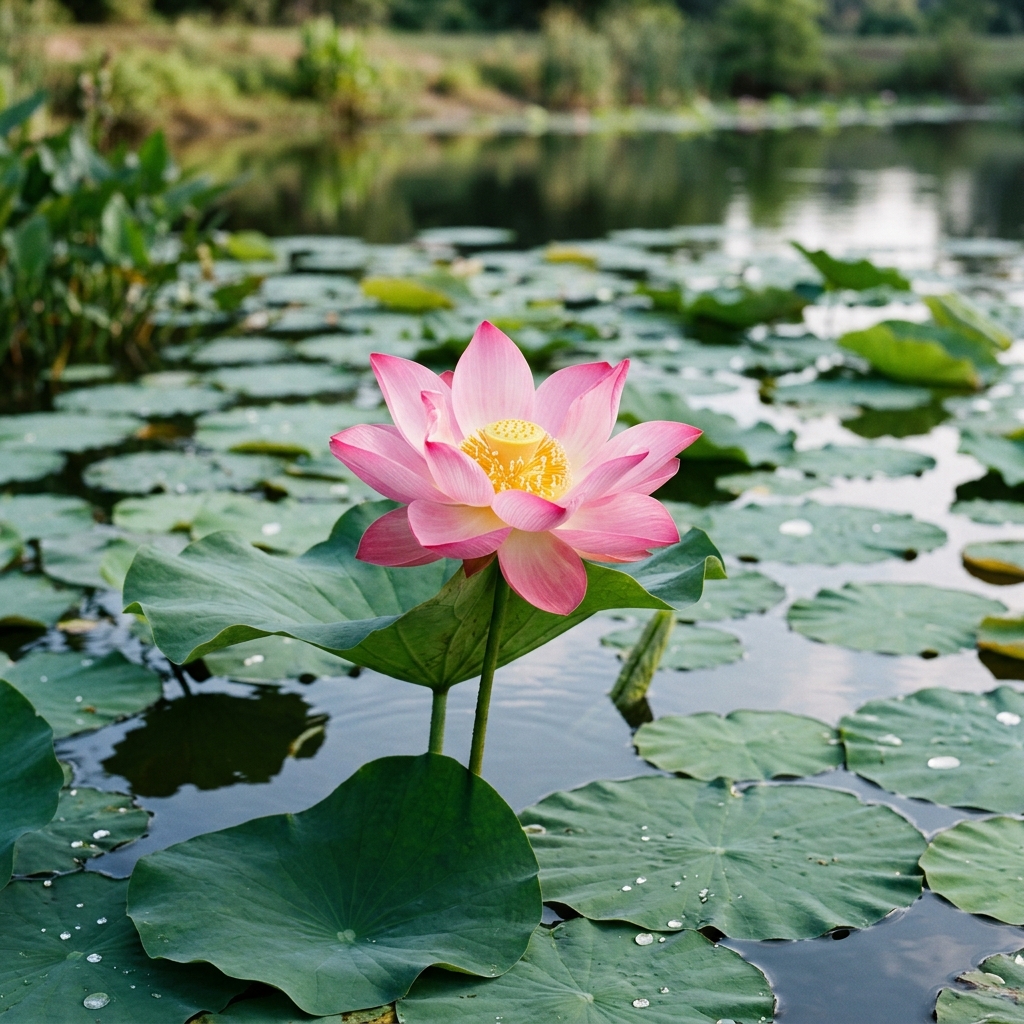
Original Image — 1024 × 1024 px
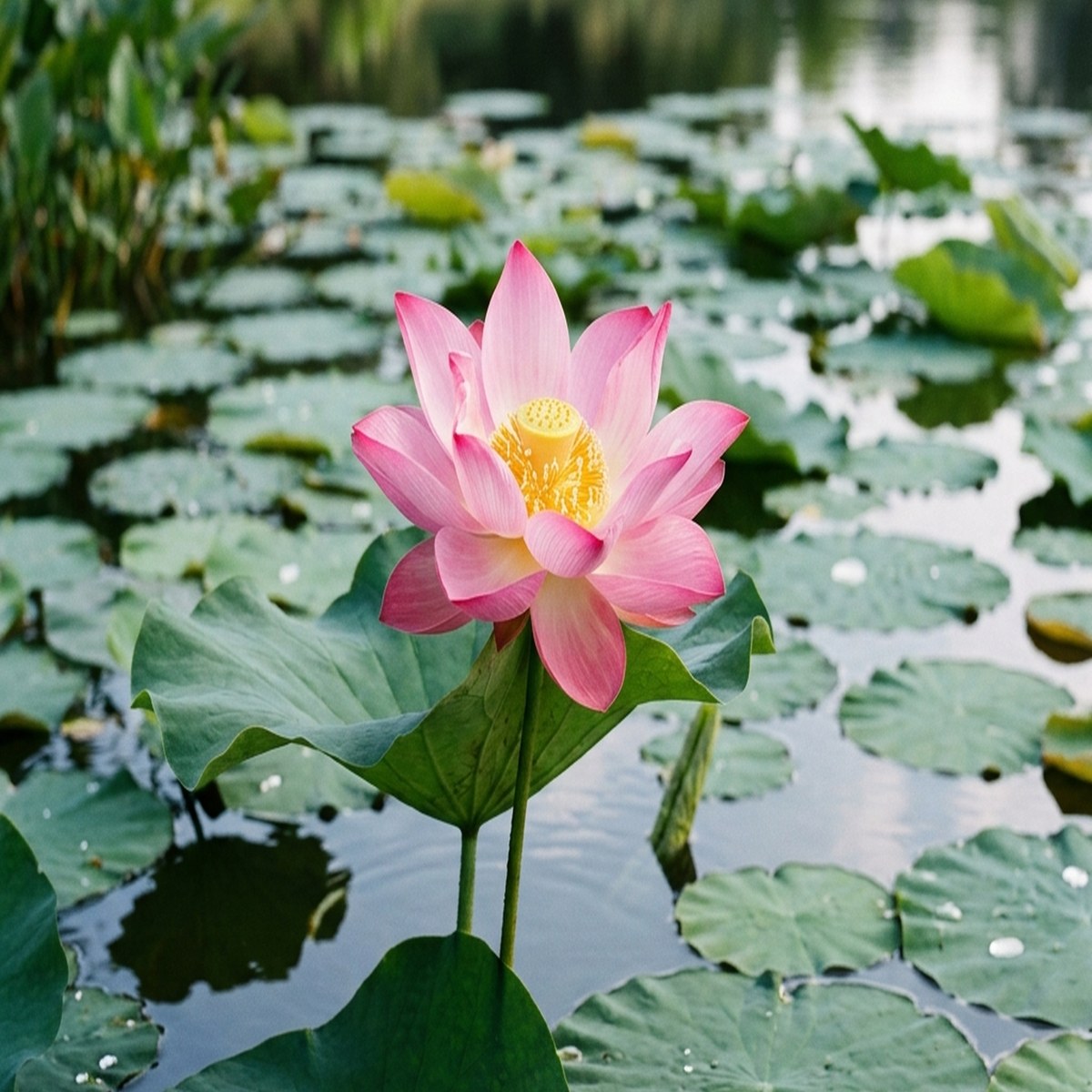
Square Crop — 1200 × 1200 px
| Detail | Original | Square Crop |
|---|---|---|
| Dimensions | 1024 × 1024 px | 1200 × 1200 px |
| Shape | Original frame | 1:1 square |
| Format | PNG | JPG |
| File size | 788.9 KB | 243.4 KB |
The square result is larger in pixel dimensions because the cropped area was exported at 1200 × 1200 pixels. Cropping and output resizing can be used together, but enlarging a crop cannot add detail that was not present in the original image.
Circle Crop Example
In this example, the lotus is placed inside a circular frame. The result is saved as PNG so the area around the circle remains transparent.
Original Image — 1024 × 1024 px
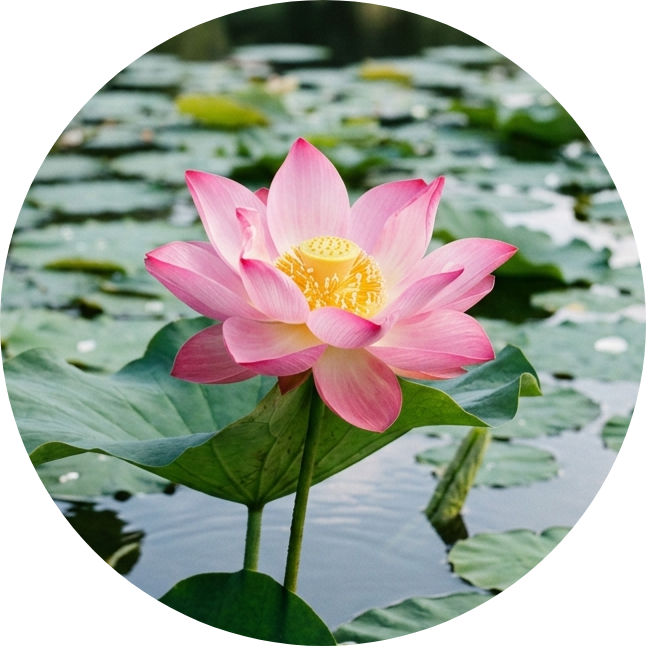
Circle Crop — 646 × 646 px
| Detail | Original | Circle Crop |
|---|---|---|
| Dimensions | 1024 × 1024 px | 646 × 646 px |
| Shape | Square image | Circle with transparent corners |
| Format | PNG | PNG |
| File size | 788.9 KB | 750.7 KB |
Note: Cropping removes everything outside the selected frame. It does not stretch the subject or restore missing detail.
Freeform, Square, and Circle Crops
Choose the crop type that matches the result you need:
- Freeform crop: Move each side of the frame independently. This is useful for documents, banners, product details, and unusual image shapes.
- Square crop: Uses the same width and height. A 1:1 frame works well for profile pictures, product images, and square posts.
- Circle crop: Uses a square crop area with a circular mask. Choose PNG or WebP when you want the corners around the circle to stay transparent.
How Aspect Ratios Work
An aspect ratio describes the shape of the crop frame. It compares width with height. For example, 1:1 is square, 16:9 is wide, and 9:16 is tall.
The crop frame can become larger or smaller while keeping the same ratio. This helps you prepare an image for a particular layout without stretching it.
| Ratio | Shape | Common use |
|---|---|---|
| 1:1 | Square | Profile images, square posts, and product pictures |
| 4:5 | Portrait | Tall social posts and mobile layouts |
| 16:9 | Widescreen | Video thumbnails, presentations, and website images |
| 9:16 | Vertical | Stories, short videos, and phone screens |
| 3:2 | Photo | Photographs, blog images, and prints |
| 21:9 | Ultra-wide | Wide banners and cinematic headers |
Use cases: crop images for profiles, social posts and websites
Ready-made sizes can help you prepare an image without calculating the ratio yourself.
- Profile pictures: Use a 400 × 400 or 800 × 800 square crop. For more profile-specific controls, use the Profile Picture Resizer.
- Square posts: A 1080 × 1080 crop provides a square layout for social posts and product images.
- Portrait posts: A 1080 × 1350 crop creates a taller image that uses more vertical screen space.
- Stories and vertical content: A 1080 × 1920 crop uses a 9:16 frame.
- Video thumbnails: A 1280 × 720 crop provides a 16:9 widescreen image.
- Website banners: Wide crops such as 1920 × 600 can be useful for page headers and hero sections.
These are common starting sizes. Platform recommendations can change, so check the latest requirements before preparing an important upload.
Choose JPG, PNG, or WebP
The best output format depends on the image and how you plan to use it.
- JPG: A practical choice for photographs. It supports adjustable quality but does not support transparent backgrounds.
- PNG: Useful for logos, graphics, screenshots, and circle crops that need transparent corners.
- WebP: Supports modern web compression and transparency. It can be useful for website images when the destination supports it.
A circular image saved as JPG cannot keep transparent corners. The empty area must be filled with a solid colour, such as white. Choose PNG or WebP when transparency is required.
Cropping and Resizing Are Different
Cropping changes what is visible by removing part of the image. Resizing keeps the full picture but changes its width and height.
For example, you can crop a square section from the middle of a landscape photograph. You can then resize that square result to a specific output size. These are two separate actions.
Making a cropped image larger may make it look softer because resizing cannot restore detail that was removed or missing from the original. To change dimensions without cutting away content, use the Image Resizer. To reduce file size, use the Image Compressor.
Privacy and browser processing limits
The image file is processed inside your browser and is not sent to TryFormatter for cropping. The finished image remains on your device unless you choose to upload or share it somewhere else.
Processing speed depends on the image size, browser, and available device memory. Very large images may take longer or may not open on older phones and low-memory devices.
To apply the same crop shape or ratio to several files, use the Bulk Image Cropper.
Frequently Asked Questions
Is my image uploaded to a server?
The image file is processed inside your browser and is not sent to TryFormatter for cropping. The result stays on your device unless you choose to upload it elsewhere.
Can I crop an image into a circle?
Yes. Choose Circle to create a round image. Export it as PNG or WebP to keep the corners transparent. JPG fills the corners with a solid background.
What is the difference between cropping and resizing?
Cropping removes parts of an image. Resizing keeps the full image but changes its width and height.
Can I choose a custom aspect ratio?
Use Freeform when you want to adjust the crop width and height yourself. You can also select one of the available fixed ratios.
Which output format should I choose?
Choose JPG for photographs, PNG for graphics or transparent circle crops, and WebP for modern website images with optional transparency.
Why does a JPG circle crop have a background?
JPG does not support transparency. The area outside the circle must be filled with a solid colour, such as white.
Can I crop several images at once?
This tool is designed for one image at a time. Use the Bulk Image Cropper to process several files with the same crop settings.
Does the cropper work on mobile devices?
Yes, it works in supported mobile browsers. Touch controls and processing speed depend on the browser, image size, and available device memory.
How large can the input image be?
The tool supports images up to 10 MB. For very large files, browser performance may vary depending on your device memory and browser capabilities.
Does the crop area adjust if I change the output size?
Yes. If you change the output size after setting a crop ratio, the crop area will automatically adjust to match. For Freeform crops, the dimensions will scale while keeping the same width-to-height ratio.
Can I undo or redo crop adjustments?
No, the tool does not support undo/redo. Each change replaces the previous state, so consider saving a backup if you want to keep the original.